

Acuity Assessment & Triage Configuration
The Acuity Assessment Setting module in Mazecare OS allows healthcare organizations to configure standardized clinical triage systems (such as the Emergency Severity Index - ESI, Australasian Triage Scale - ATS, Hong Kong Accident & Emergency Triage Guidelines - HKAETG, or Manchester Triage System - MTS).
By establishing standard triage scale definitions, visual color indicators, and medical coding systems (e.g., SNOMED CT), clinics and emergency departments can triage patients consistently, prioritize urgent cases in the Queue Management System (QMS), and provide automated clinical assistance during patient intake.
Acuity Assessment Setting Catalog
The main catalog page displays all configured triage scoring systems within your organization, along with system-provided global standards.
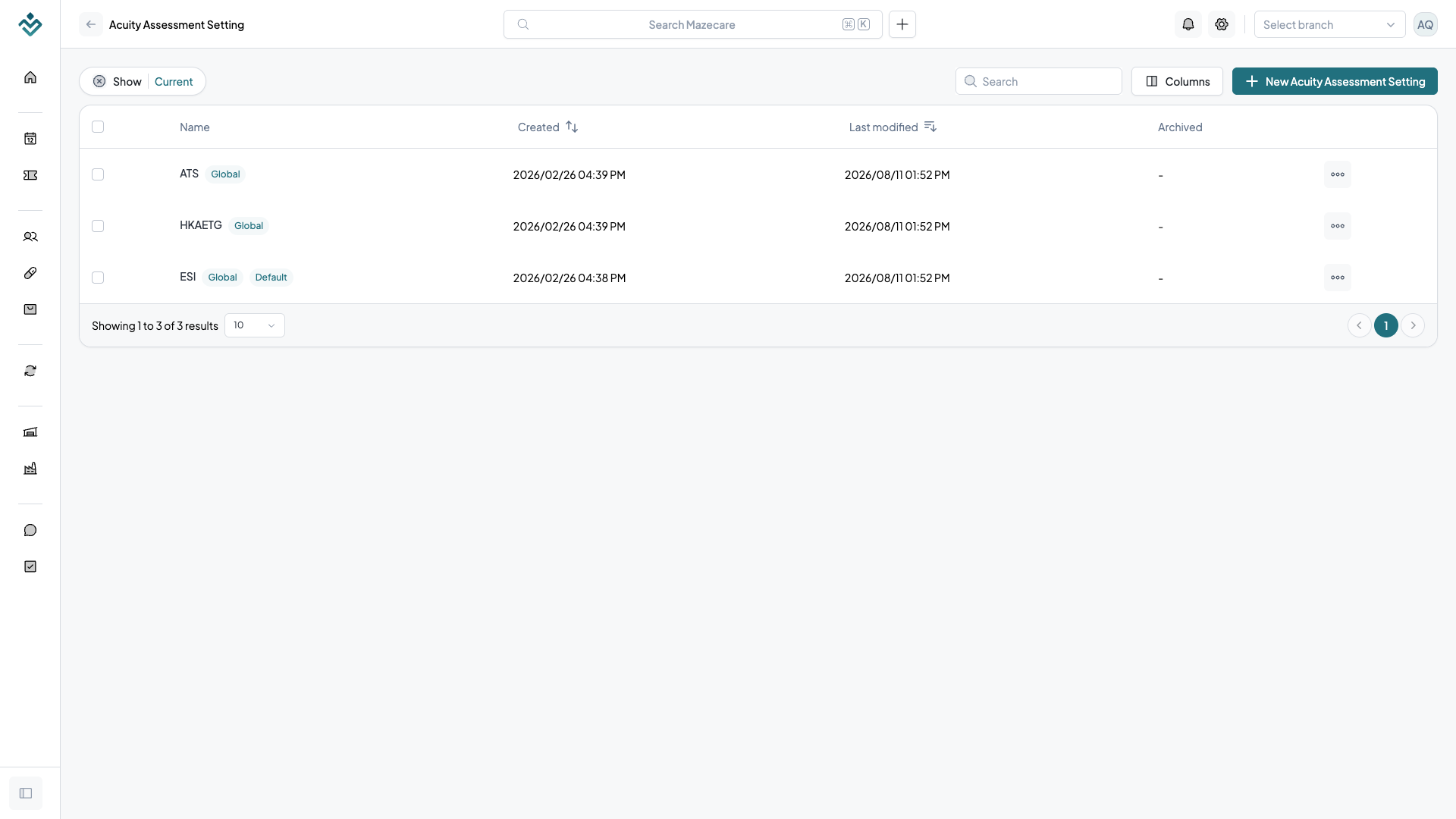
Table Columns & Actions:
- Name: The identifier name of the triage system (e.g., ESI, ATS, HKAETG).
- Badges:
- Global: Indicates an out-of-the-box sdtandard preset provided by Mazecare.
- Default: Highlights the active default triage scale applied across your clinic when creating encounters and calculating triage priority.
- Created & Last Modified: Timestamps recording when the setting was authored and last updated.
- Set as Default: Through the row action menu, users with appropriate permissions can set any configured scale as the organization's active default.
- Archive / Delete: Archive custom scales that are no longer in clinical use.
Configuring a Triage Scale
Clicking any row in the list opens the comprehensive Acuity Assessment Setting editor:
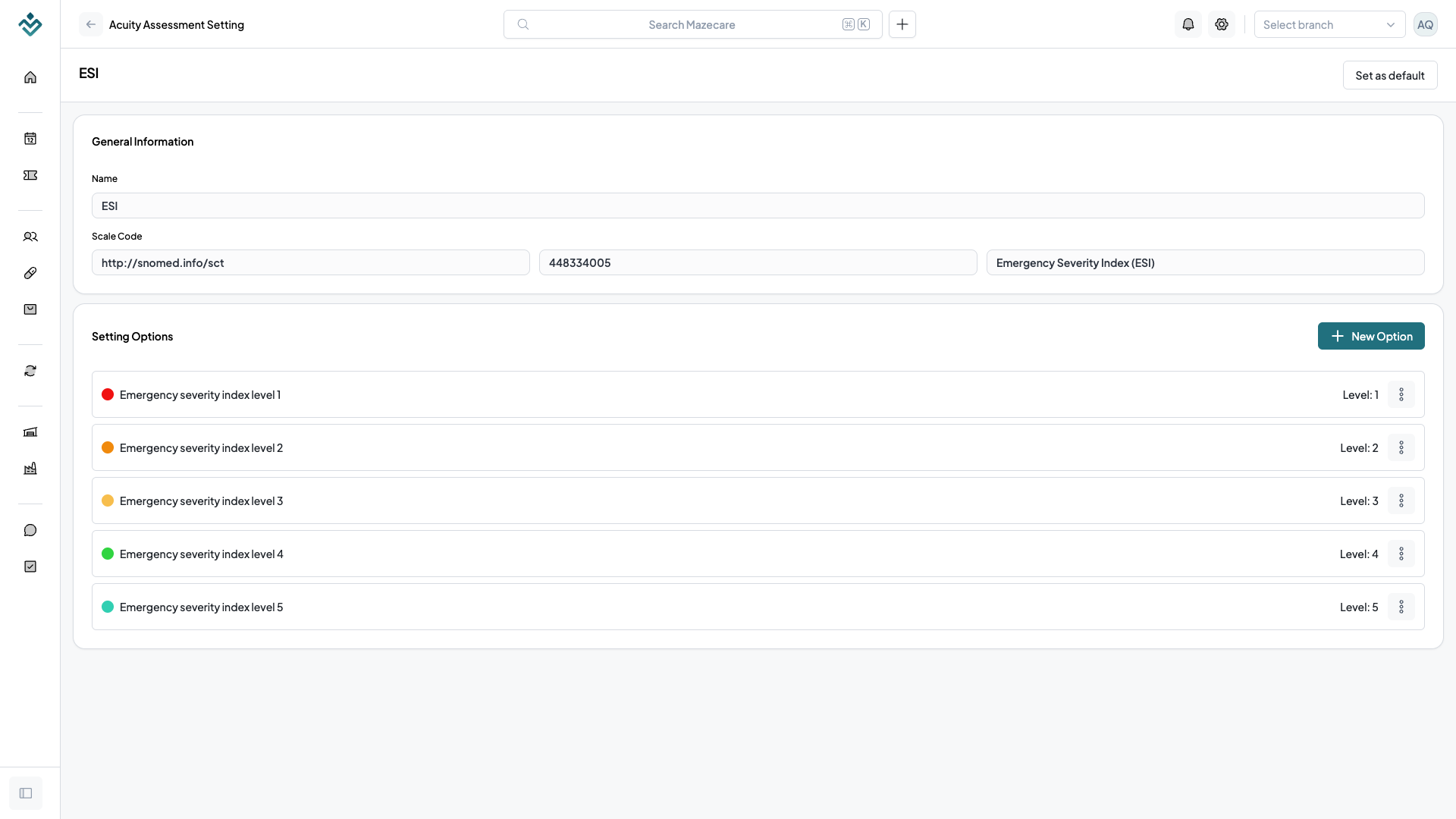
The configuration screen contains two primary sections:
1. General Information
- Name: Enter a recognizable label for the triage framework (e.g.,
ESI,ATS (Australasian Triage Scale)). - Scale Code: Standardized coding metadata used for interoperability and electronic health record (EHR) exchanges:
- Coding System URL: The formal terminology system URI (e.g.,
http://snomed.info/sctfor SNOMED CT, orhttp://hl7.org/fhir/ValueSet/triage-severity). - Code: The specific concept code identifying the triage classification system (e.g.,
448334005for Emergency Severity Index). - Display Name: Human-readable label for the classification system (e.g., Emergency Severity Index (ESI)).
- Coding System URL: The formal terminology system URI (e.g.,
2. Setting Options (Acuity Levels & Urgency Tiers)
The Setting Options card defines each tier in the triage hierarchy. Options are sorted in rank order from highest priority to lowest priority.
- Reordering Levels: Use the drag handle icon on the left of each row to reorder priority levels. Mazecare automatically syncs rank order to ensure queue sorting algorithms prioritize urgent tiers first.
- Color Indicator: Visual color badge displayed on queue boards, tickets, and clinical headers.
- Level Name & Coding Display: Descriptive title for the tier (e.g., Emergency severity index level 1, Emergency severity index level 2).
- Rank Indicator: Displays the level index (e.g.,
Level: 1,Level: 2).
Adding and Editing Acuity Level Options
Clicking New Option or selecting Update Option from a row opens the Option modal:
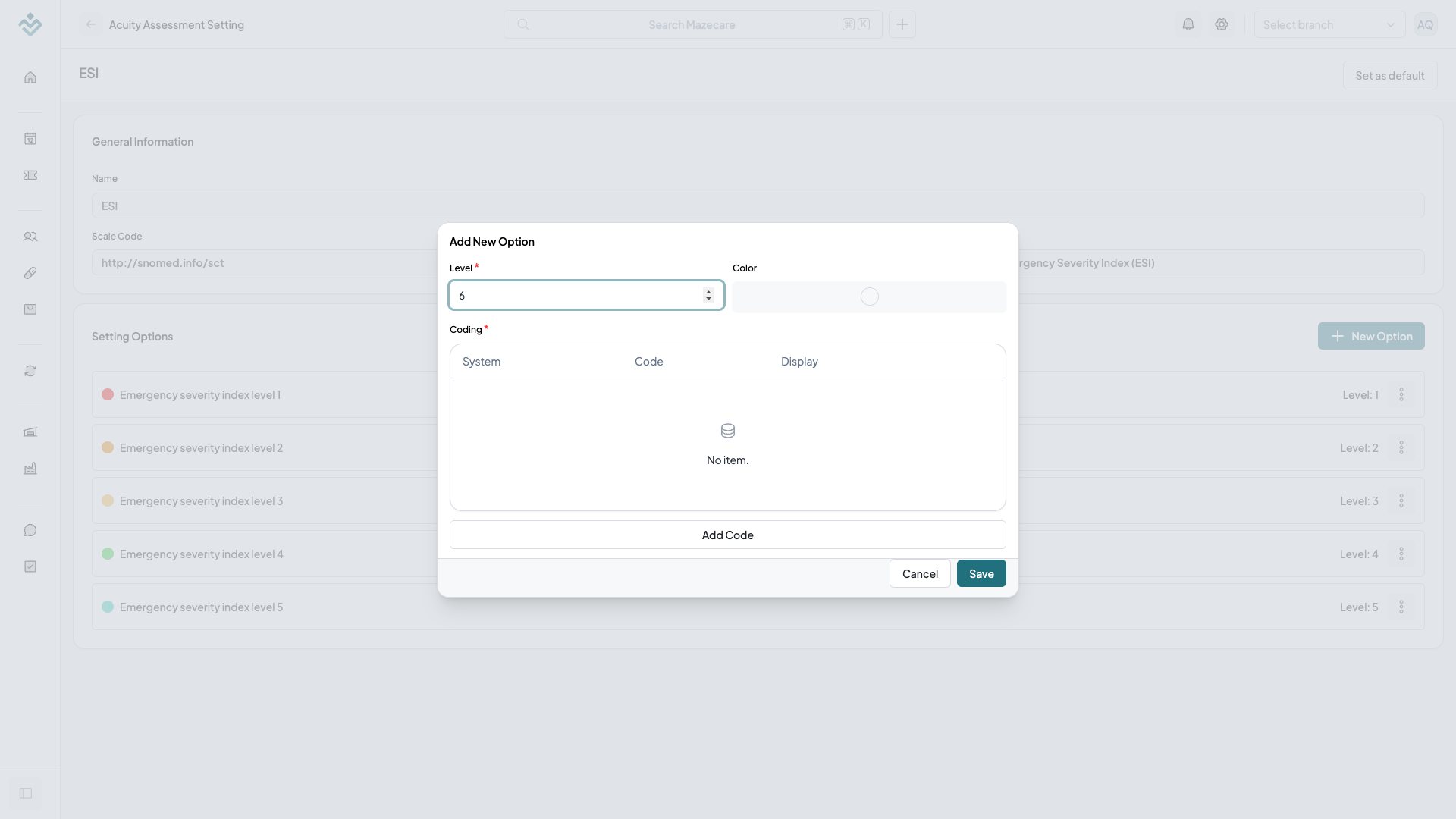
Form Fields:
| Field | Requirement | Description |
|---|---|---|
| Level | Required | Numerical rank for the triage option (e.g., 1 for Resuscitation, 2 for Emergent, up to 5 for Non-Urgent). |
| Color | Optional | Color picker to select the hex color code for visual identification on queue tickets and dashboard banners. |
| Coding System Table | Required | Standardized terminology codes mapping this level to external medical vocabularies: • System: Terminology system URL (e.g., http://snomed.info/sct). • Code: Concept identifier code (e.g., 448334005-1). • Display: Clinical description displayed to practitioners (e.g., Emergency severity index level 1 - Resuscitation). |
Common Standard Triage Scales Reference
Below are standard references pre-configured or commonly used in Mazecare:
| Level | ESI (Emergency Severity Index) | Color | Target Waiting Time | Typical Clinical Criteria |
|---|---|---|---|---|
| 1 | Resuscitation | 🔴 Red | Immediate (0 min) | Cardiac/respiratory arrest, severe trauma, unconscious. |
| 2 | Emergent | 🟠 Orange | ≤ 15 min | Severe pain, chest pain with cardiac risk, lethargy, high risk. |
| 3 | Urgent | 🟡 Yellow | ≤ 30 min | Stable vitals requiring multiple resources (labs, imaging, IV). |
| 4 | Less Urgent | 🟢 Green | ≤ 60 min | Minor illnesses requiring single resource (simple suture, x-ray). |
| 5 | Non-Urgent | 🔵 Blue | ≤ 120 min | Prescription refill, wound dressing change, routine checkup. |
Clinical Workflow Integration
1. Queue Management & Ticket Prioritization
When a patient is checked in and assigned an acuity tier:
- High-acuity tickets (Level 1 & Level 2) appear highlighted with their respective color badges at the top of the provider's queue.
- Audio and visual alerts notify triage and medical officers of emergent arrivals.
2. Consultation Screen Triage Priority Widget
Within encounter templates, the Triage Priority widget displays live category calculation:
- AI Recommendation: Continuously analyzes vitals, AVPU consciousness scores, and clinical complaints to suggest the appropriate category.
- Manual Override: Practitioners can adjust or override the score directly from the interface with logged justification.
Prescription & Invoice Layouts
Configure medication dispensing labels, thermal roll printers, bundled prescription treatment packages, and itemized billing invoice templates in Mazecare.
CDS & Knowledge Base
Configure Clinical Decision Support (CDS) rules, automated safety triggers, clinical warning actions, and AI intent evaluation in Mazecare.