

Prior Authorizations & Payor Pre-Approvals
In modern healthcare and medical insurance schemes, Prior Authorization (PA)—also known as Pre-Approval or Pre-Certification—is the formal administrative and clinical process whereby healthcare providers obtain advance financial clearance from an insurance payor or Third Party Administrator (TPA) before administering high-cost medical treatments, surgical procedures, specialized diagnostics, or complex therapies.
For outpatient clinics, specialist practices, and day surgery centers, securing prior authorization is critical:
- Financial Protection: Obtains an official Letter of Guarantee (LOG) or pre-approval certificate from the insurer, confirming the covered benefit ceiling and guaranteeing direct payor reimbursement.
- Eliminates Claim Denials: Verifies medical necessity, policy waiting periods, and benefit exclusions before incurring clinical costs, preventing retrospective claim disputes.
- Patient Transparency: Clarifies patient out-of-pocket liabilities (such as policy deductibles, co-insurance percentages, and non-covered items) in advance of surgery or treatment.
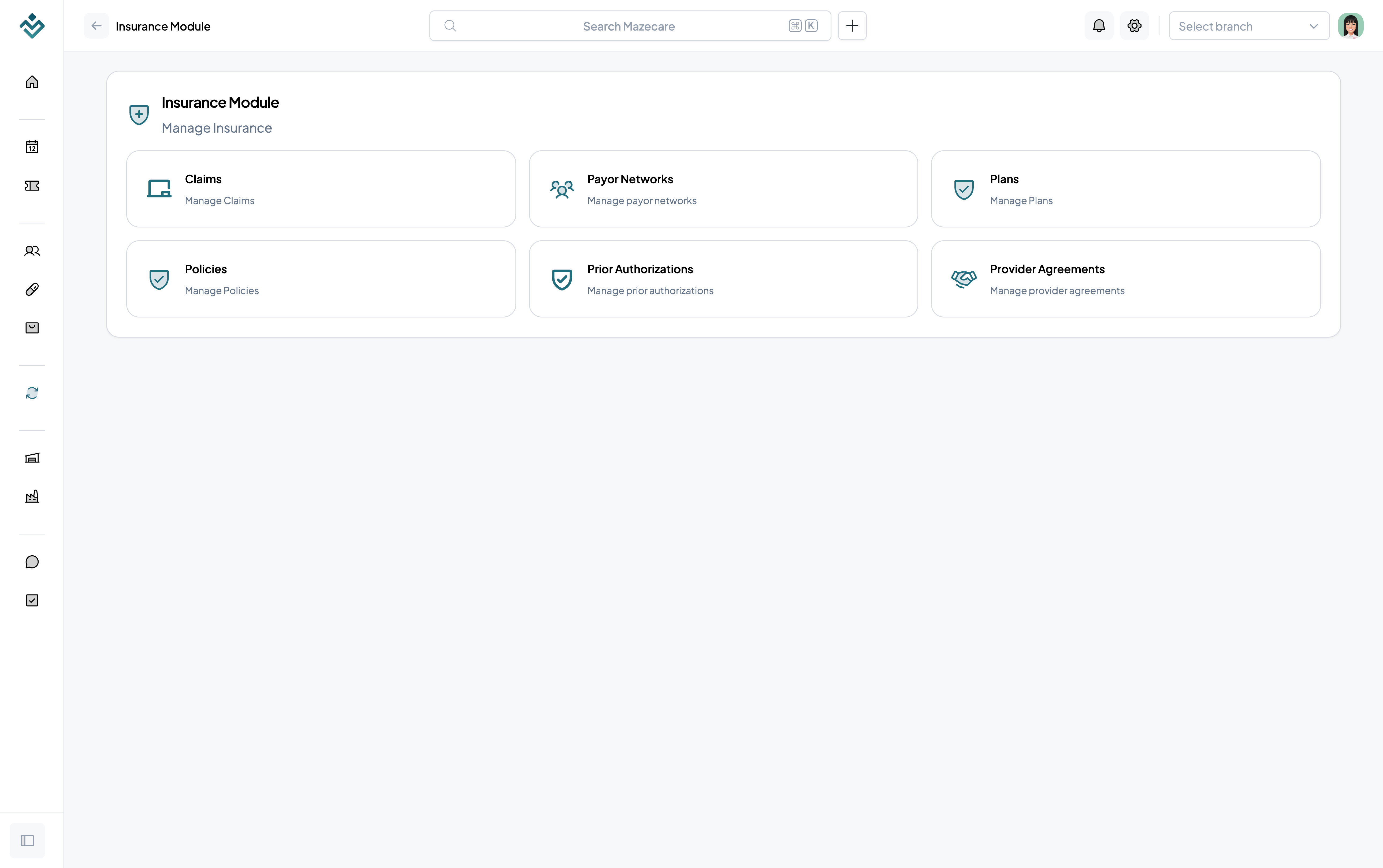
The Insurance Module Group
Within Mazecare OS, Prior Authorization is a core pillar of the unified Insurance Module ecosystem (/revenue-cycle/insurance or /insurances), which coordinates the entire revenue cycle between clinical care and payors:
- Claims: Pre-submission scrubbing, batch claims management, and post-encounter reimbursement.
- Payor Networks: Institutional insurance networks and third-party administrator directories.
- Plans: Benefit master plans, coverage tiers, sub-limits, and co-payment rules.
- Policies: Individual patient insurance policies, policyholder verification, and active validity periods.
- Prior Authorizations: Pre-procedure clinical justification, tariff estimation, and Letter of Guarantee (LOG) adjudication.
- Provider Agreements: Negotiated fee schedules, semantic clinical rules, and contracted pricing schemes.
Detailed Step-by-Step Walkthrough
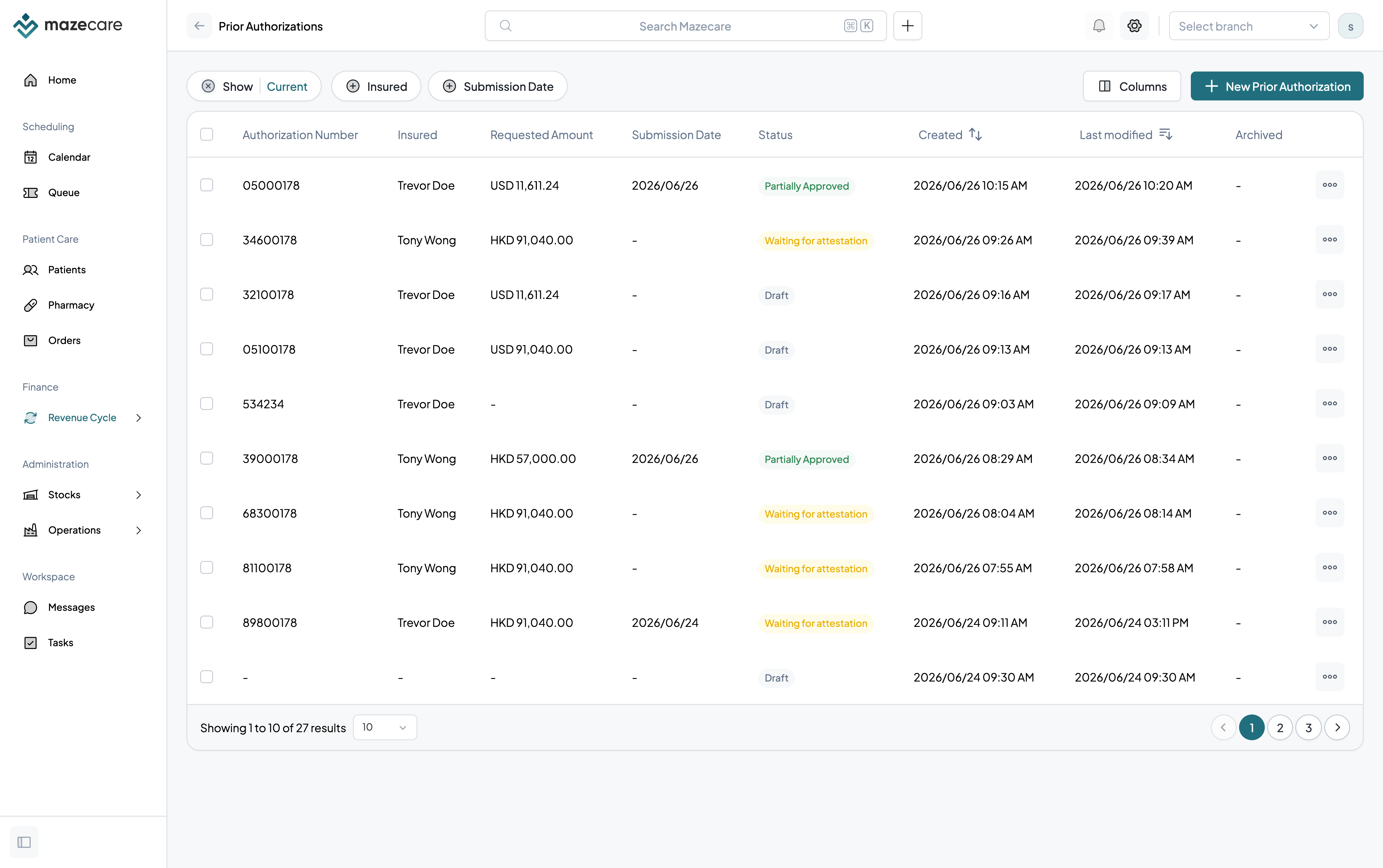
Step 1: Navigating the Prior Authorizations Table
To manage existing authorization requests or initiate a new pre-approval:
- In the sidebar navigation, go to Revenue Cycle → Insurance → Prior Authorizations (
/revenue-cycle/insurance/prior-authorizations). - The dashboard displays a centralized table listing all authorization records with key metrics:
- Authorization Number: Unique authorization tracking reference (e.g.,
39000178,05000178). - Insured: Patient name and profile.
- Requested Amount: Total estimated procedure expense submitted to the insurer.
- Submission Date: Timestamp when the request was dispatched.
- Status: Current authorization lifecycle state (Draft, Waiting for Attestation, Partially Approved, Approved, Rejected).
- Created & Last Modified: Administrative audit timestamps.
- Authorization Number: Unique authorization tracking reference (e.g.,
- Click + New Prior Authorization to initiate a new request, or click any table row to open the comprehensive authorization detail workspace.
Step 2: Prior Authorization Detail Header Configuration
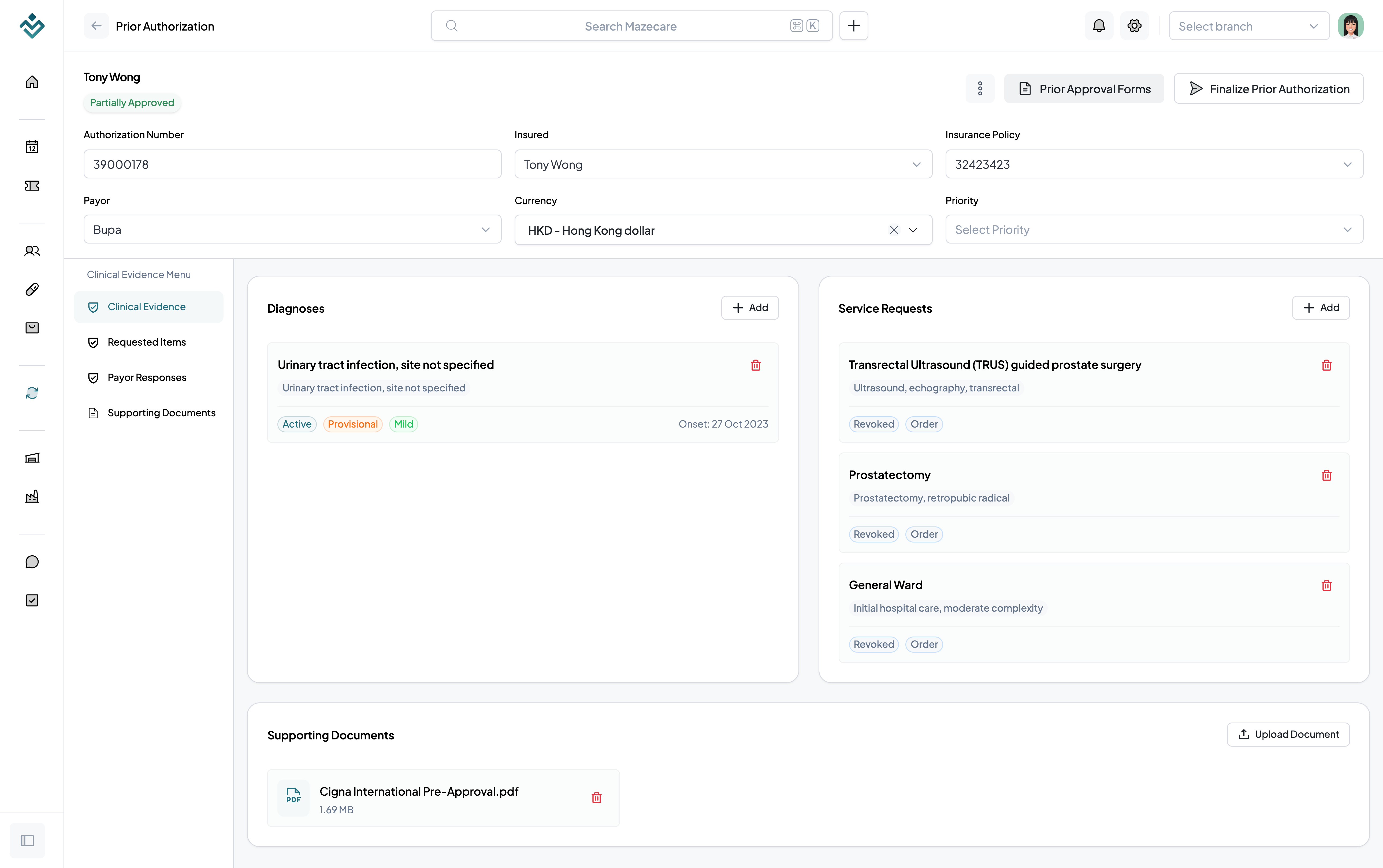
Inside the Prior Authorization Detail view, the top header card establishes the foundational administrative and insurance bindings:
- Authorization Number: The unique payor tracking number or internal case identifier (e.g.,
39000178). - Insured: The patient receiving care (e.g., Tony Wong).
- Insurance Policy: The active insurance policy number linked to the patient (e.g.,
32423423). - Payor: The insurance carrier or TPA responsible for adjudication (e.g., Bupa, AIA, Cigna).
- Currency: Transaction currency (e.g.,
HKD - Hong Kong dollar,USD). - Priority: Clinical urgency level (e.g., Elective, Urgent, Emergency).
- Lifecycle Status Badge: Prominently displays the current approval standing (e.g., Partially Approved).
Below the header, the workspace is organized into four specialized sub-modules:
- Clinical Evidence
- Requested Items
- Payor Responses
- Supporting Documents
Step 3: Sub-Module 1 — Clinical Evidence
Payor medical directors require comprehensive clinical justification to evaluate medical necessity. The Clinical Evidence sub-module consolidates all clinical data needed for the request across three structured cards:
- Diagnoses Card:
- Lists primary and secondary diagnostic indications coded using standardized taxonomies (e.g., ICD-11
8A00.0 Epilepsy). - Displays clinical status (Active, Relapse), verification status (Provisional, Confirmed), severity (Mild, Moderate, Severe), and onset dates.
- Lists primary and secondary diagnostic indications coded using standardized taxonomies (e.g., ICD-11
- Service Requests Card:
- Defines proposed clinical procedures, surgical operations, diagnostic investigations, or ward confinements (e.g., Transrectal Ultrasound (TRUS) guided prostate surgery, Prostatectomy (retropubic radical), General Ward admission).
- Displays order statuses and authorization readiness.
- Supporting Documents Card:
- Displays pre-attached clinical documents (e.g., Cigna International Pre-Approval.pdf).
- Provides a direct Upload Document action for adding clinical justification files.
Step 4: Sub-Module 2 — Requested Items & Expense Line Items
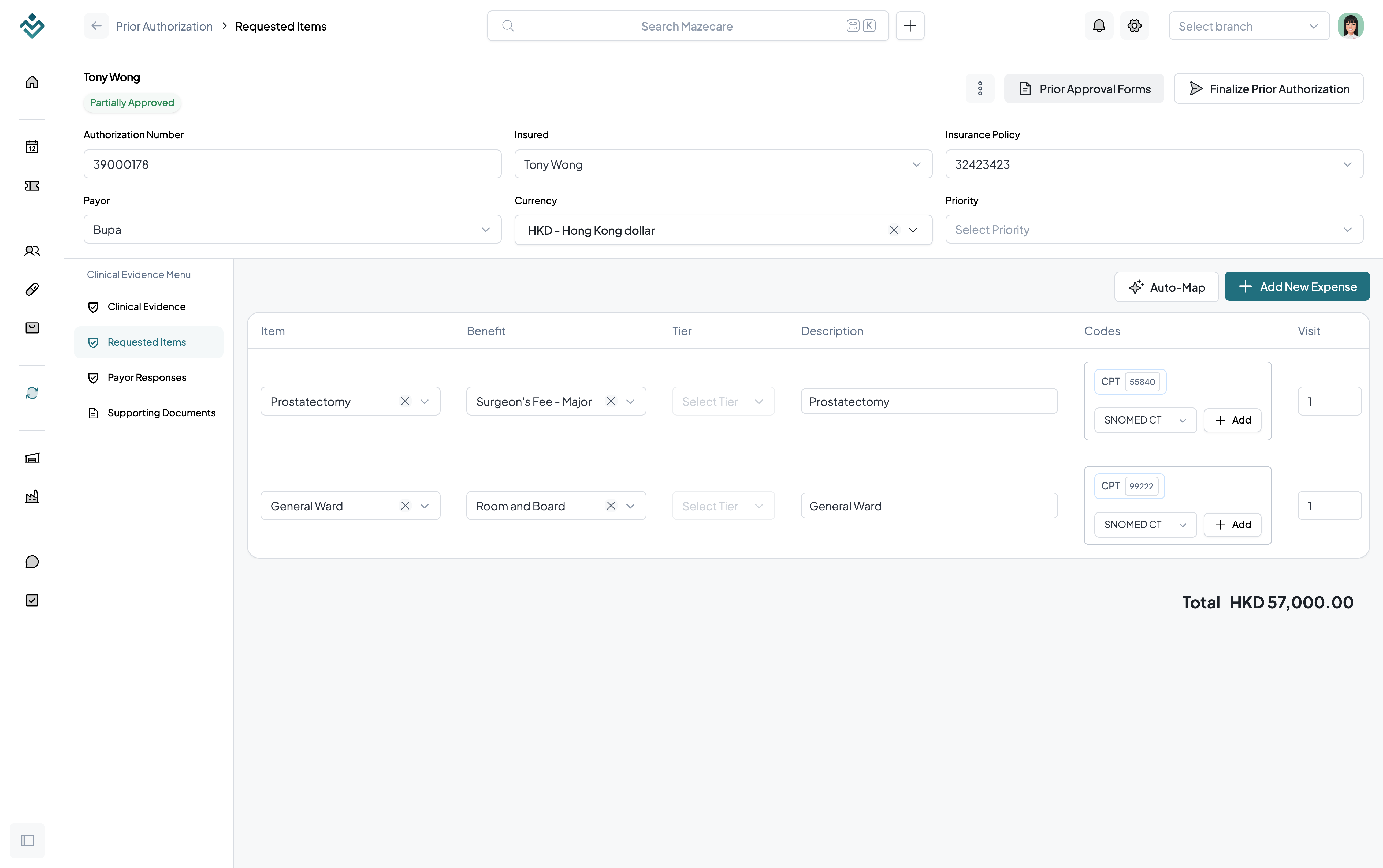
The Requested Items sub-module translates the clinical service requests into itemized financial estimates for insurer review:
- Adding Expense Items:
- Click + Add New Expense to add billable procedure lines, or click Auto-Map to automatically generate expense lines from the service requests defined in the Clinical Evidence tab.
- Configuring Expense Properties:
- Item & Description: Specify procedure names (e.g.,
Prostatectomy,General Ward). - Benefit Category: Map the procedure to the policy's specific benefit clause (e.g., Surgeon's Fee - Major, Room and Board).
- Medical Coding: Attach standardized procedure codes (CPT
55840, CPT99222, SNOMED CT). - Estimated Amount: Enter the estimated tariff/cost for each line item.
- Item & Description: Specify procedure names (e.g.,
- Financial Total: The system computes the aggregated financial estimate submitted to the payor (e.g.,
Total HKD 57,000.00).
Step 5: Sub-Module 3 — Payor Response & AI-Assisted LOG Digitization
When the insurer reviews the request and issues an official determination, clinic staff record the decision in the Payor Responses sub-module. Mazecare provides two methods to capture payor responses:
Method A: AI-Assisted Document Digitization (Letter of Guarantee Upload)
- In the Payor Responses tab, select Digitize & Adjudicate Payor Response.
- Upload LOG Document: Upload the PDF or scanned image of the official Letter of Guarantee (LOG) or pre-approval letter received from the insurer (e.g.,
AIA LOG - Trevor Doe Prostatectomy.pdf). - Multimodal AI Processing: The system activates advanced OCR and multimodal reasoning models (Qwen VL OCR + Gemini 1.5 Pro / Flash) to parse the document, extract tabular adjudication values, identify covered surgical limits, and detect annual deductible requirements.
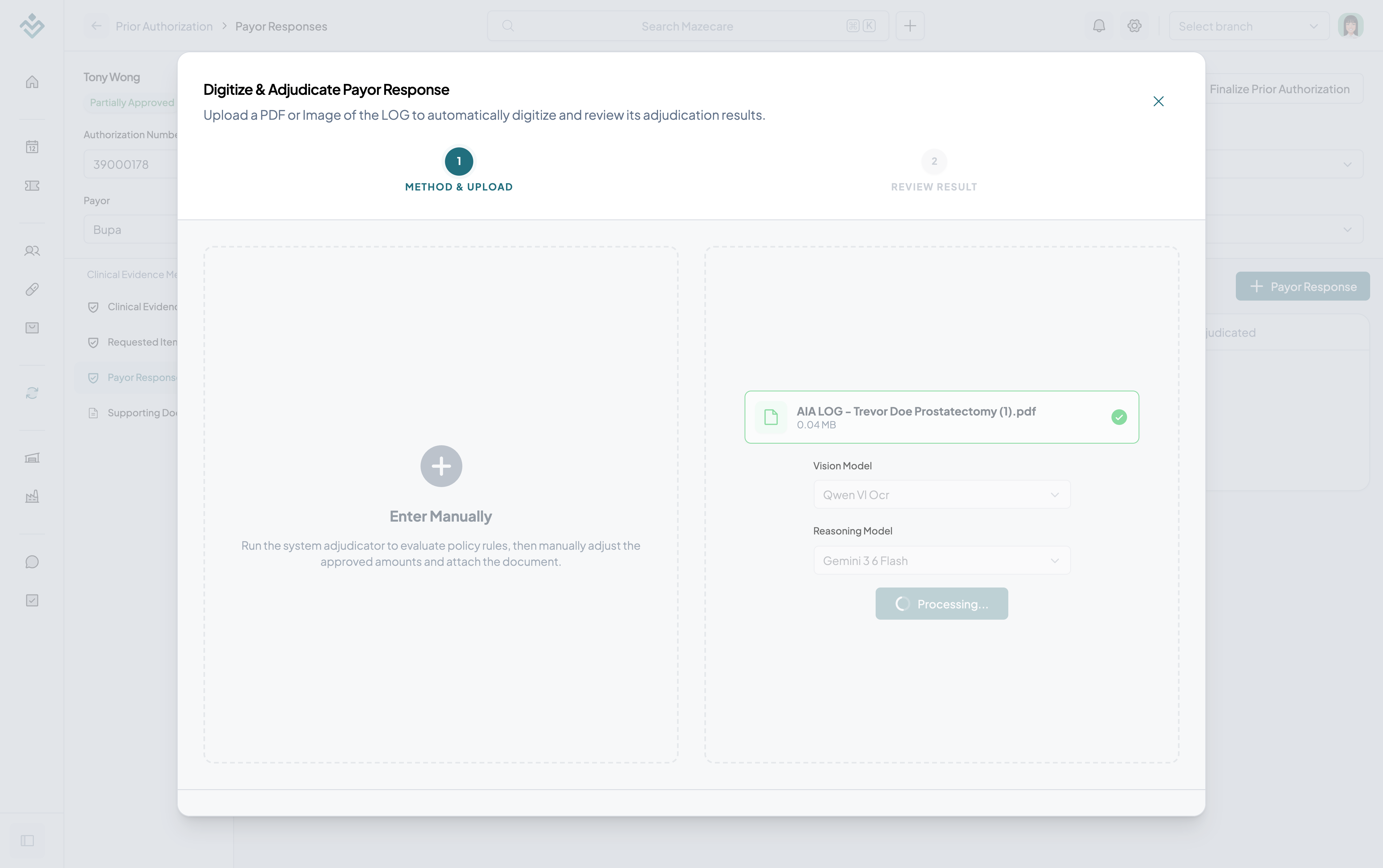
- Reviewing Digitized Results:
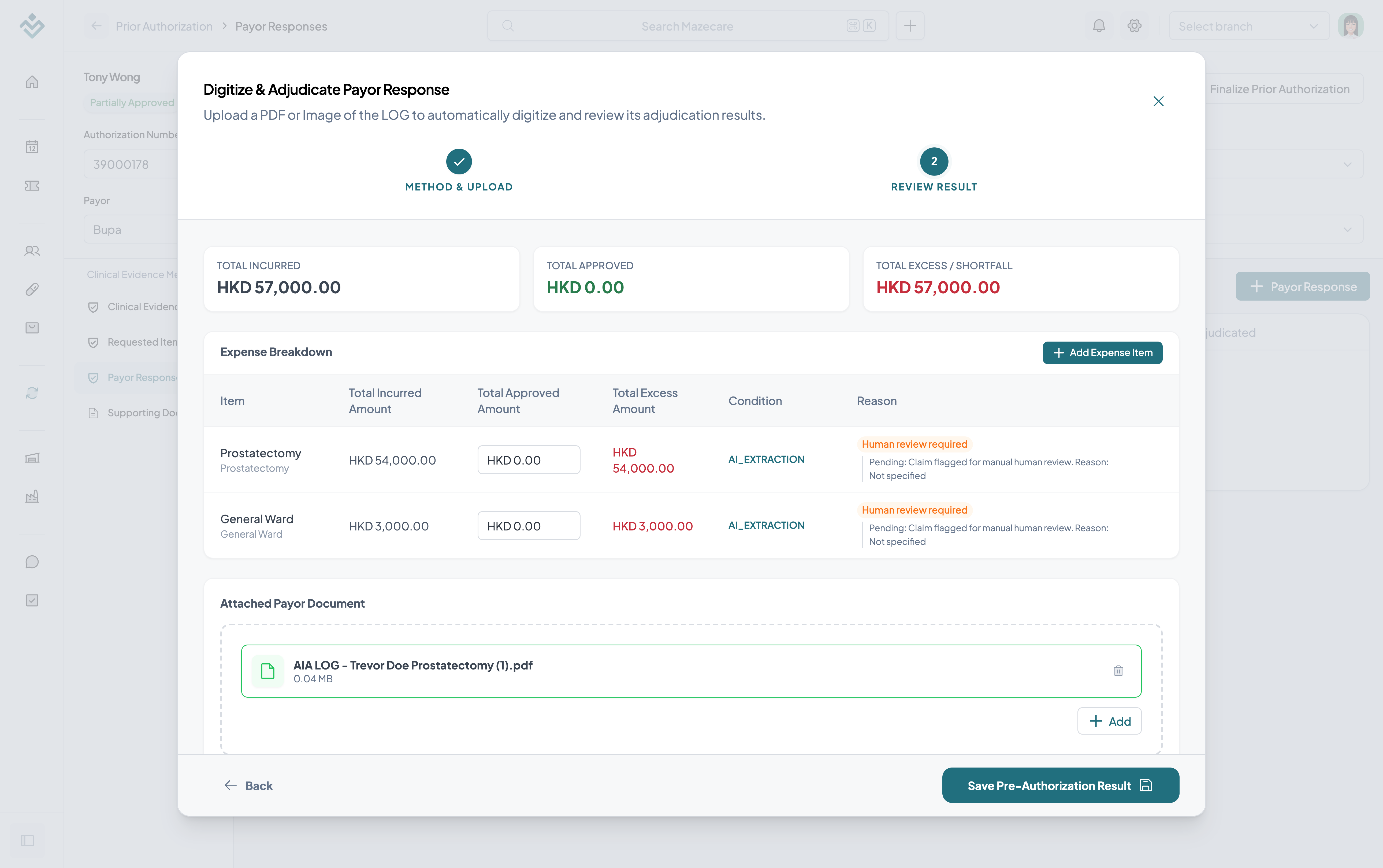
- The system displays the extracted Total Incurred, Total Approved, and Total Excess / Shortfall amounts.
- Review itemized line items extracted by AI (
AI_EXTRACTION). - Any ambiguous clauses are flagged for clinical/administrative review (e.g., Human review required).
- Click Save Pre-Authorization Result to commit the findings.
Method B: Manual Adjudication Entry
Alternatively, click Enter Manually to run the system rule adjudicator, manually input approved benefit amounts and patient deductibles, and attach the insurer confirmation file.
Step 6: Verifying Split-View LOG Details & Financial Summaries
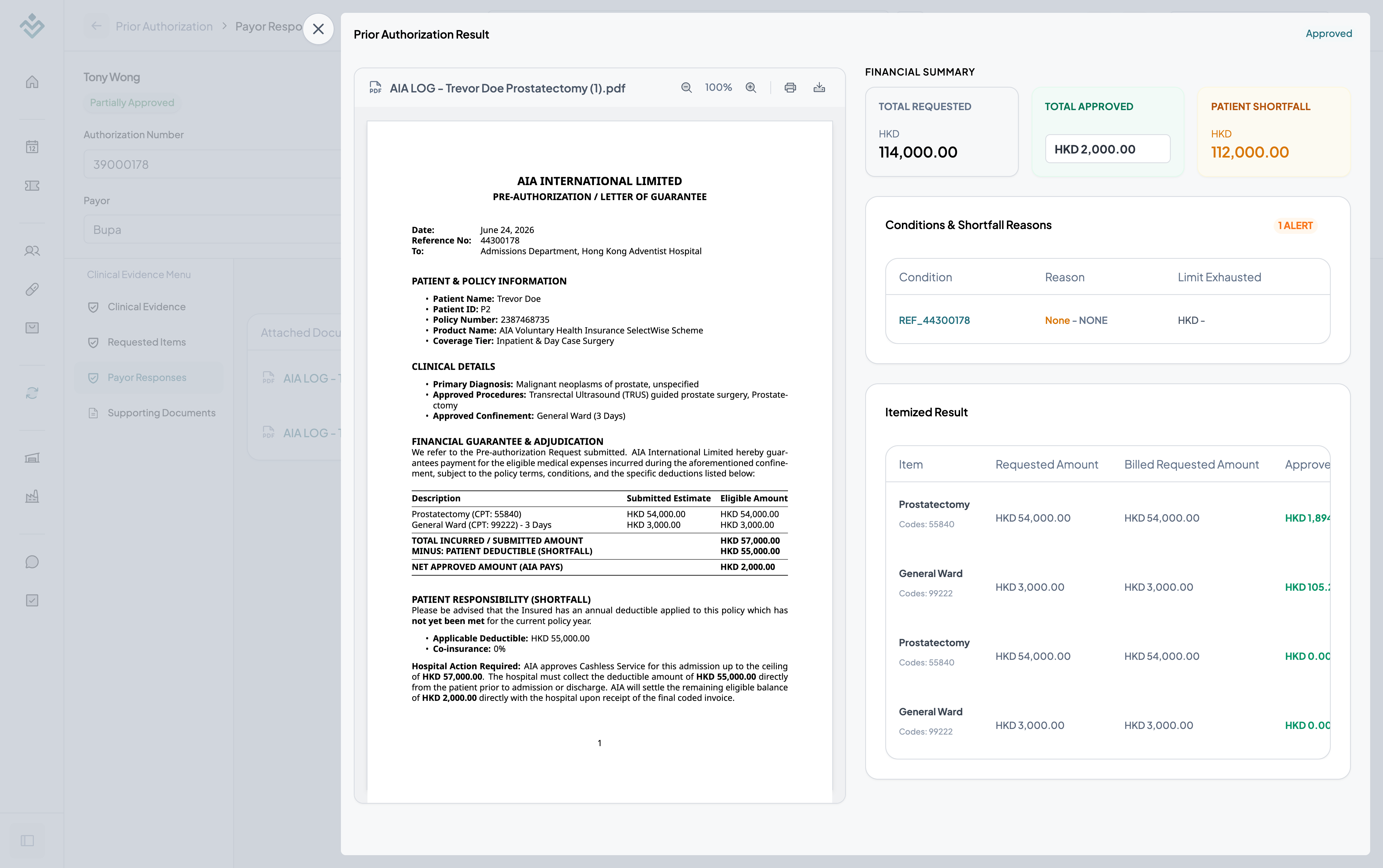
Once digitized, staff can inspect the adjudication breakdown using Mazecare's integrated Split-View Document Inspector:
- Left Pane (Embedded PDF Viewer): Displays the full original Letter of Guarantee issued by the insurance carrier (e.g., AIA International Limited Pre-Authorization / Letter of Guarantee), showing patient details, approved confinement (e.g., General Ward - 3 Days), and insurer remarks.
- Right Pane (Adjudication Financial Summary):
- Financial Guarantees: Compares Total Requested (
HKD 114,000.00), Total Approved (HKD 2,000.00), and Patient Shortfall / Deductible (HKD 112,000.00). - Conditions & Deductible Rules: Details applicable policy rules, such as annual deductibles (e.g.,
HKD 55,000.00patient deductible applied) and hospital collection instructions. - Itemized Adjudication Table: Displays line-by-line requested vs. approved amounts for each procedure code (e.g., CPT
55840Prostatectomy, CPT99222General Ward).
- Financial Guarantees: Compares Total Requested (
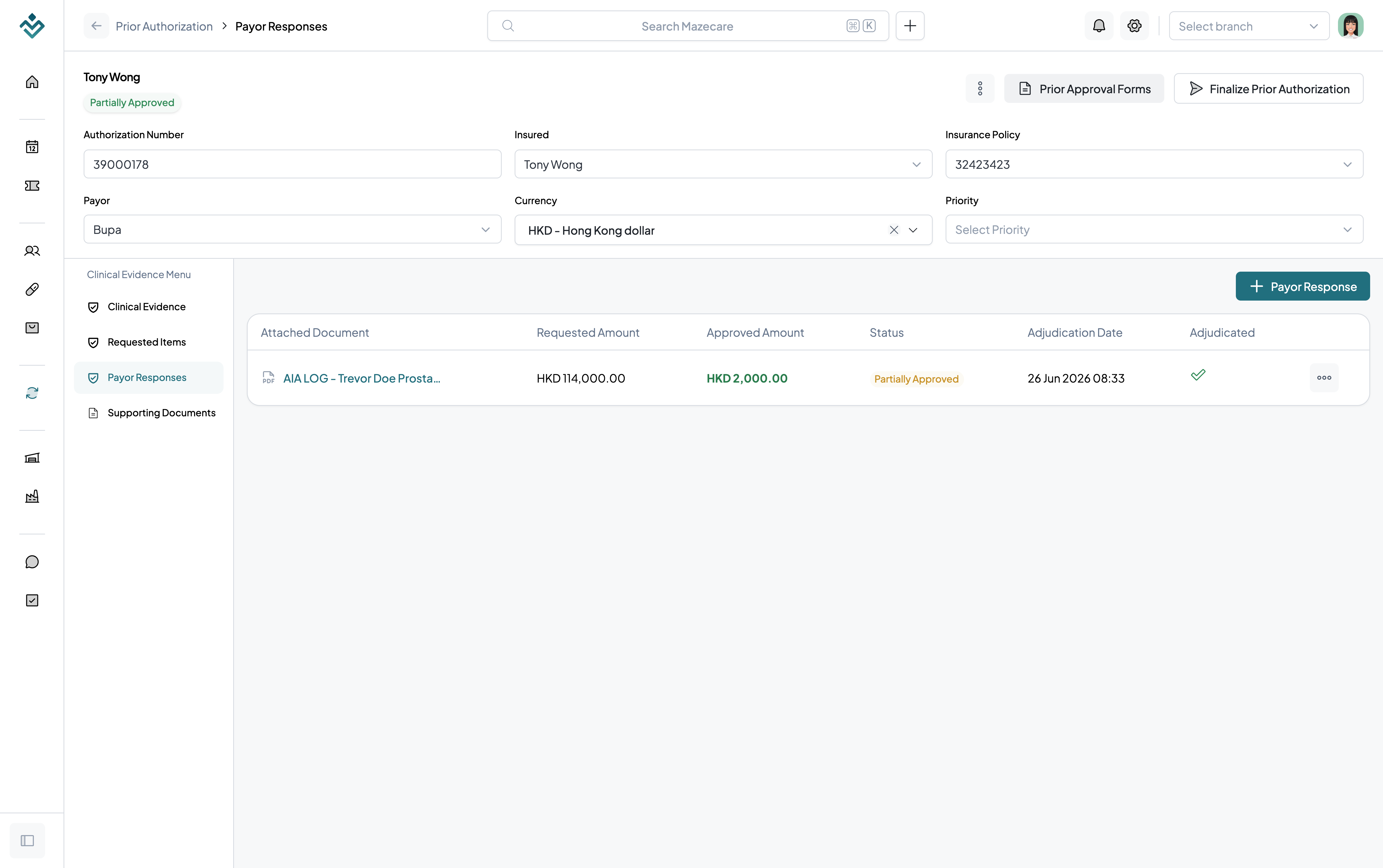
- Payor Response Summary List: The main Payor Responses tab maintains a permanent record of all attached guarantee documents, total approved amounts, adjudication timestamps, and approval statuses.
Step 7: Sub-Module 4 — Supporting Documents & File Management
The Supporting Documents sub-module serves as a centralized digital repository for all ancillary clinical and administrative documentation:
- Diagnostic Scans & Radiology: Attach MRI, CT, ultrasound, or X-ray reports justifying the procedure.
- Laboratory & Pathology Reports: Upload biopsy histology reports, blood chemistry panels, or urinalysis results.
- Clinical Referrals & Consultation Letters: Attach specialist referral letters, medical second opinions, or signed patient consent forms.
- Regulatory Audit Trail: All uploaded files are version-controlled, encrypted, and accessible for insurer audits or hospital admission coordination.
Report Templates & Analytics
Comprehensive standard operating procedure for building dynamic analytics reports, utilizing natural language AI generation, and configuring customized resource builders across patients, encounters, invoices, transactions, appointments, and inventory.
Claim Submission
Comprehensive standard operating procedure for generating insurance claims from patient invoices, linking prior authorizations, utilizing automated medical coding and benefit Auto-Map, and executing real-time policy adjudication.